
Quality and Lighthouse Reports
Applies to: Codeless
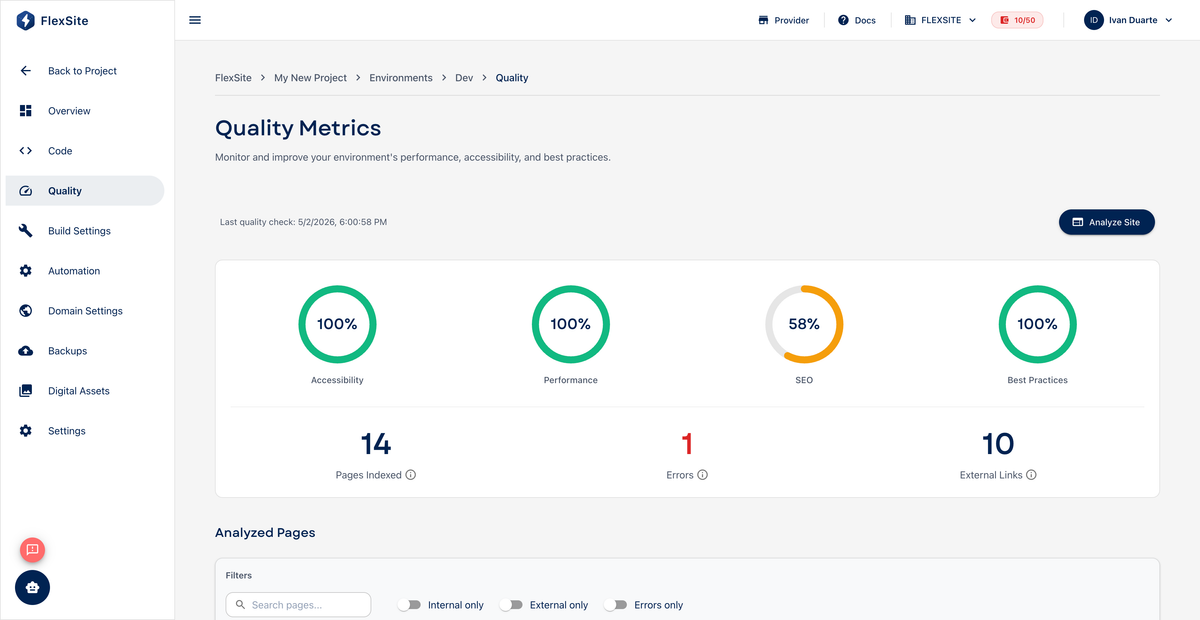
Overview
Quality runs automated health checks on your Codeless site — including Lighthouse scores for speed, accessibility, SEO, and best practices. Use it before launch and after major theme or content changes.
Key concepts
- Lighthouse — Google’s 0–100 scorecard for web health (higher is better).
- Performance — page load speed; low scores often mean images or caching need work.
- Accessibility — keyboard and screen-reader friendliness.
- SEO — basic search readiness (titles, mobile layout, etc.).
Steps
- Open Environments, select an environment, then Quality.
- Run or Refresh the report.
- Read each category — expand failing rows for plain-language hints.
- Follow links to Build Settings or advisories for infrastructure fixes.
- Fix content issues in Drupal via Quick Login (missing alt text, huge images).
- Re-run until scores meet your team’s launch bar (many aim for 70+ performance on production).
Project rollup
Open project Quality to compare staging vs production before you Sync Environment to go live.
Low scores before launch predict slow visitor experiences — worth fixing before ad campaigns, not only for technical pride.