
Automation
Applies to: All
Overview
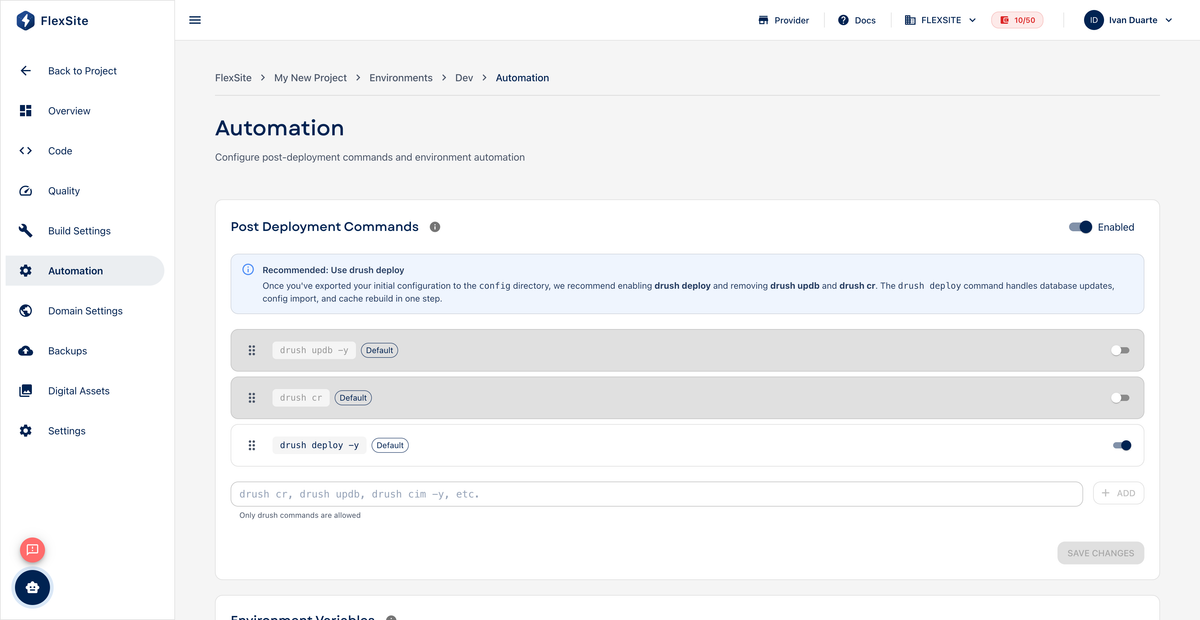
Automation runs small maintenance tasks automatically after FlexSite finishes deploying your site — for example clearing caches or applying database updates. Most Codeless editors never need this page unless a developer or agency added custom steps.
Key concepts
- Deploy — when new code or configuration reaches an environment (after a sync, theme change, or Git push on FlexLab).
- Automation step — one command run in order, top to bottom, on the server.
- Drush — Drupal’s standard admin tool (developers use commands like cache rebuild). You only pick Drush if your agency documented the exact command.
Do I need Automation?
- Codeless marketers — usually no; use Quick Login and dashboard tools instead.
- Agencies on Codeless — sometimes yes, for repeatable post-update scripts.
- FlexLab — common for
drush cim(import config) anddrush cr(rebuild cache) after pipeline deploys. See Post-Deployment Automation in the FlexLab book.
Steps — review existing steps (if any)
- Open Environments, select an environment, then Automation.
- Read each step label — ask your developer before deleting unfamiliar commands.
- Note the order; steps run sequentially.
Steps — add a step (with developer guidance)
- Click Add script or New automation step.
- Choose the type your developer specified (Drush is typical for Drupal).
- Paste the exact command they provided.
- Drag to reorder if needed, then Save.
- Trigger a deploy (sync, theme publish, or Git push) and check logs on Overview for success.
FlexLab vs Codeless
- FlexLab — runs after GitLab pipeline deploy.
- Codeless — runs after dashboard-driven deploys and some sync operations.
Never paste commands from the internet without your developer’s approval — they run on your live server.