
Publication Process
Applies to: All
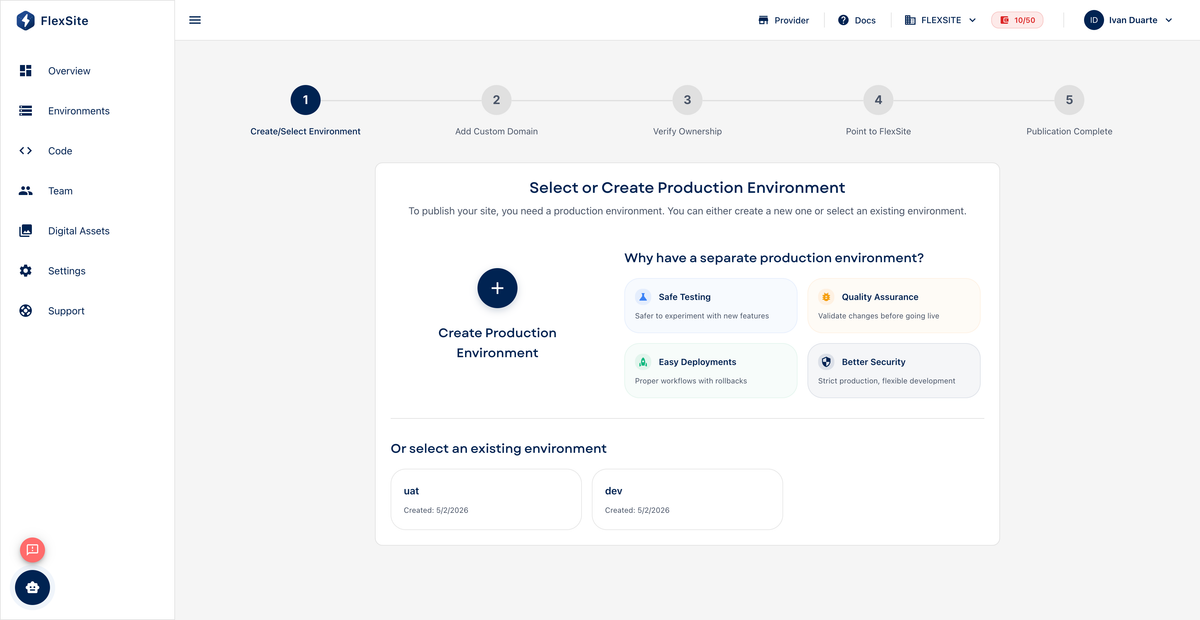
Overview
Publication is how you connect your FlexSite-hosted website to a custom domain — the address your visitors type (such as www.example.com) instead of the temporary FlexSite URL.
Key concepts
- Domain — your registered web name (from a registrar such as GoDaddy, Namecheap, or Google Domains).
- DNS — settings at your registrar that point the domain to FlexSite’s servers. The publication wizard shows exactly which records to add.
- HTTPS / SSL — encrypted connection (padlock in the browser). FlexSite provisions certificates after DNS is correct.
- Primary domain — the main address search engines and redirects should treat as canonical when you have several hostnames.
Prerequisites
- A Codeless or Atom project whose environment is ready.
- An ACTIVE paid plan (TRIAL accounts are usually blocked from custom domains).
- Access to your domain registrar’s DNS panel (or someone on your IT team who does).
Steps — start publication
- Open Domains in the project sidebar.
- Click Add domain or Publish to start the wizard.
- Enter the hostname you want (e.g.
www.example.comorexample.com). - Copy the DNS records the wizard displays into your registrar. This step can take up to 48 hours to propagate worldwide — patience is normal.
- Return to FlexSite; status becomes ACTIVE when verification succeeds and HTTPS is issued.
Steps — after publication
- Confirm the domain card shows HTTPS enabled.
- If you added multiple hostnames, set which one is primary.
- Test in a private browser window to ensure visitors reach the correct site.
Credits
Custom domain setup and SSL may consume credits depending on your plan. Check Billing → Usage before publishing many sites at once.