
Billing Management
Applies to: All
Overview
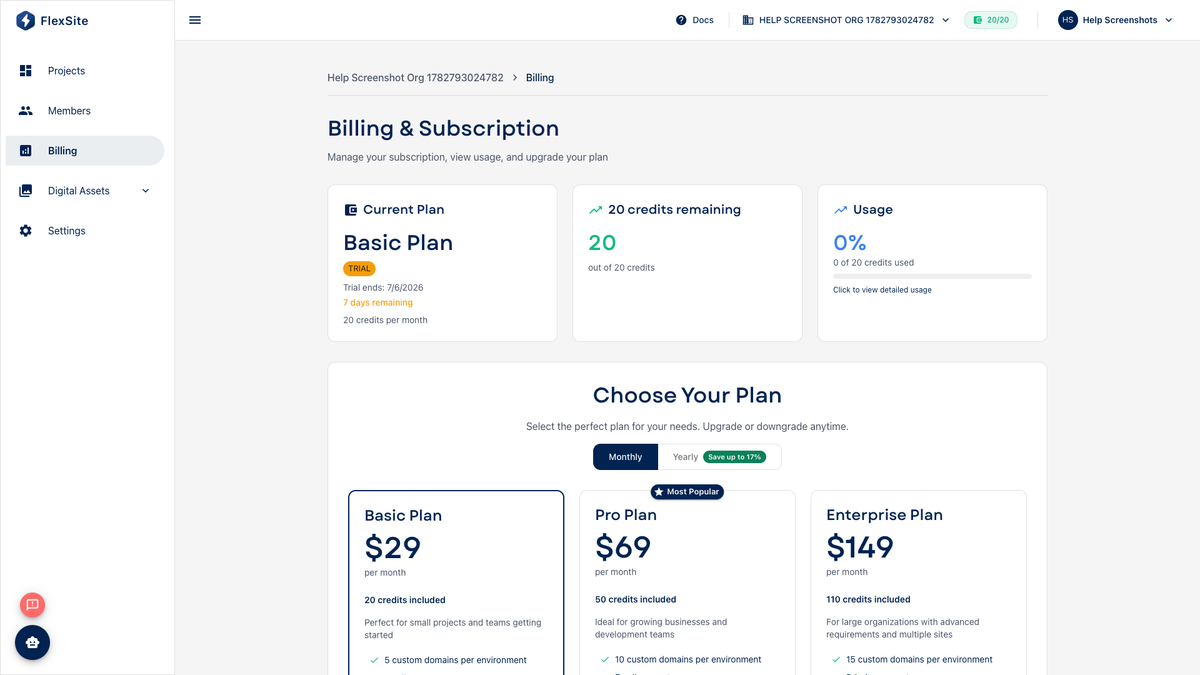
Billing is where organization owners and finance leads manage subscription plan, payment method, and upgrades. Day-to-day editors rarely need this page unless they are deciding when to move off TRIAL before a launch.
Key concepts
- TRIAL — free evaluation with a small credit pool; custom domains and Support may be blocked.
- ACTIVE — paid and current; features match your purchased plan.
- PAST_DUE — a renewal charge failed; fix payment soon to avoid FROZEN.
- FROZEN — account paused; new deploys and many actions stop until billing is fixed.
- Stripe checkout — secure payment page FlexSite opens when you upgrade (your site stays online during checkout in normal cases).
Prerequisites
- Organization owner or member with billing permission.
Steps — view your plan
- Open Billing in the org sidebar.
- Read plan name, status badge, and renewal date.
- Note credits remaining and whether you are approaching zero on TRIAL.
Steps — upgrade from TRIAL
- Click Upgrade or choose a plan card that matches your expected traffic and number of sites.
- Complete Stripe checkout with your company card.
- Return to Billing — status should show ACTIVE.
- Confirm credits refreshed and try the action that was blocked (e.g. Domains wizard).
Steps — update payment method
- On Billing, open the payment method section.
- Add or replace the card before renewal dates.
- Resolve PAST_DUE immediately — waiting risks FROZEN and interrupted launches.
Will upgrading break my site?
Upgrading does not delete projects. Existing URLs keep working. You unlock features (domains, Support, higher credit pools) rather than rebuilding sites.
Atom-specific plan options may appear when the org has Atom projects.