
Credit Usage Breakdown
Applies to: All
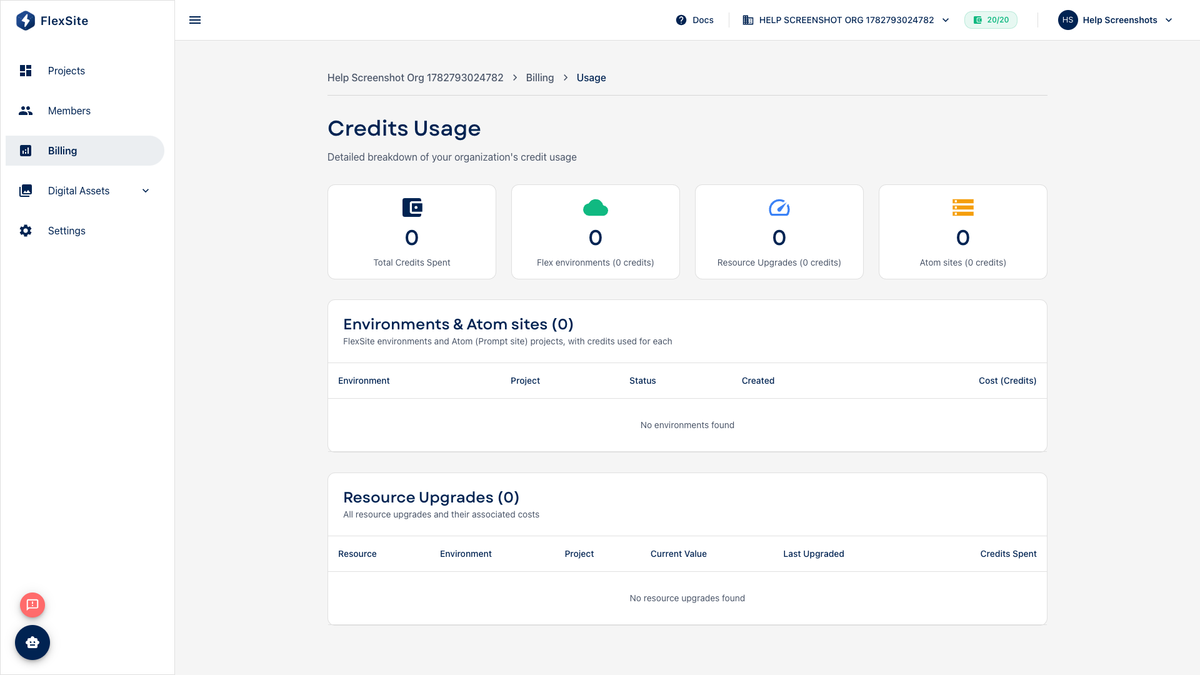
Overview
The Credit Usage Breakdown table lists every credit charge with labels like “environment,” “backup,” or “Atom.” Use it when Usage charts look high and you need the exact line items to discuss with finance or your agency.
Key concepts
- Line item — one row in the breakdown (one charge event or recurring allocation).
- Project / environment link — some rows open the related Overview when clicked.
- Resource upgrade — charges from moving Build Settings sliders (CPU, RAM, Varnish, Redis).
Steps — read the breakdown
- Open Billing → Usage.
- Open the detailed breakdown or table view if separate from the chart.
- Select the billing period you care about.
- Walk sections in order: environments → resource upgrades → backups → sync → Atom → other.
- Click linked rows to see which project caused a spike.
Interpreting common line items
| Label | What it usually means |
|---|---|
| Environment | New copy created or monthly hosting allocation |
| CPU / RAM / Cache | Build Settings increase on an environment |
| Backup / Restore | Manual or safety snapshot on Backups |
| Publication | Custom domain or SSL provisioning step |
| Atom | Atom site creation or related metered action |
Plan states
- TRIAL — watch remaining credits daily; one production launch may require Upgrade first.
- FROZEN — breakdown may be historical only; fix Billing before new charges accrue.
Next steps after a surprise bill
- Identify the environment row with the largest recurring charge.
- Open Build Settings — was production oversized for actual traffic?
- Delete duplicate staging environments you no longer use.
- Share screenshots with your account manager on enterprise plans if labels are unclear.