
Post-Deployment Automation
Applies to: FlexLab
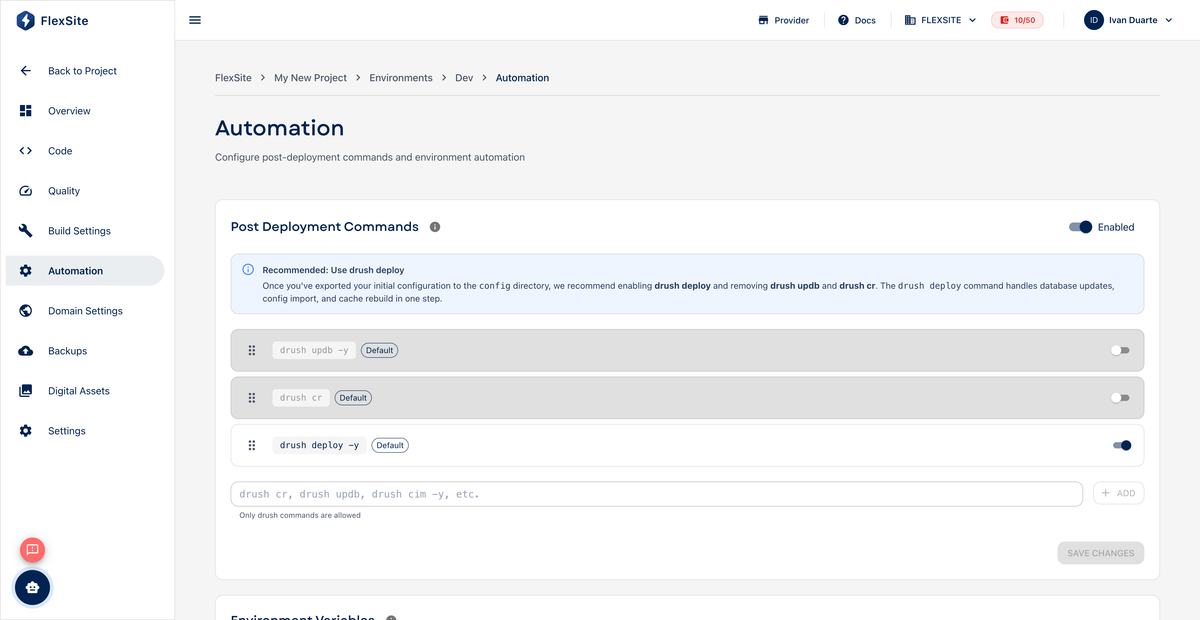
Overview
Automation runs short scripts on FlexSite *after* GitLab finishes deploying your code. Typical jobs: import Drupal configuration, rebuild caches, or reindex search — tasks that must happen on the live server, not in GitLab’s build container.
Key concepts
- Post-deploy — the moment the new code is live but Drupal may still need housekeeping commands.
- Drush — Drupal shell tool; common commands include
drush cr(cache rebuild) anddrush cim -y(import config). - Order matters — automation steps run top to bottom; import config before cache rebuild, for example.
Steps
- Open Environments, select an environment, then Automation.
- Click Add script (or similar) for each step.
- Choose type Drush, WP-CLI, or Shell as appropriate for Drupal projects use Drush.
- Enter commands such as
drush updatedb -y,drush cim -y,drush cr. - Drag steps to reorder, then Save.
- Push a commit to trigger the pipeline; open deployment logs to confirm automation succeeded.
GitLab CI vs FlexSite Automation
| Where | Best for |
|---|---|
GitLab CI (.gitlab-ci.yml) | Running tests, compiling assets, building artifacts |
| FlexSite Automation | Commands that must run against the live Drupal database on FlexSite |
Store API keys referenced in shell scripts as Environment Variables on the same Automation page.